# Getting scripty with Azure Mobile Services
- URL: https://blog.jourdant.me/post/azure-getting-scripty-with-azure-mobile-services
- Author: Jourdan Templeton
- Published: 2014-08-02T22:32:00.000Z
- Updated: 2015-01-31T22:13:06.521Z
- Category: Azure
- Tags: Azure, Node.JS, Node, Scripting
- Summary: How to send data from Bash, PowerShell, Python and VBScript to an Azure Mobile Services REST API in a few lines each.
In my opinion, [Azure Mobile Services](http://azure.microsoft.com/en-us/documentation/services/mobile-services/) is not talked about nearly enough. In many of the projects I have worked on, the ability to create a REST API within minutes and consume it within my scripts is incredibly useful.
For this post I am going to assume you have a basic knowledge of Azure Mobile Services - enough to create a service, table and define two columns. If you need some help, [click here to get started](http://azure.microsoft.com/en-us/documentation/articles/mobile-services-html-get-started/).
By the end of this post you should have some insight on how to easily 'cloud enable' an existing script. I will try to keep it as simple as I can without using external libraries where possible.
**Our scenario will be a simple app that reports the language runtime and version to an Azure Mobile Service.**
### Setup
A basic table will need to be created in your Mobile Service. We want to allow anyone with the application key to be able to insert. We'll allow anyone to retrieve this data.
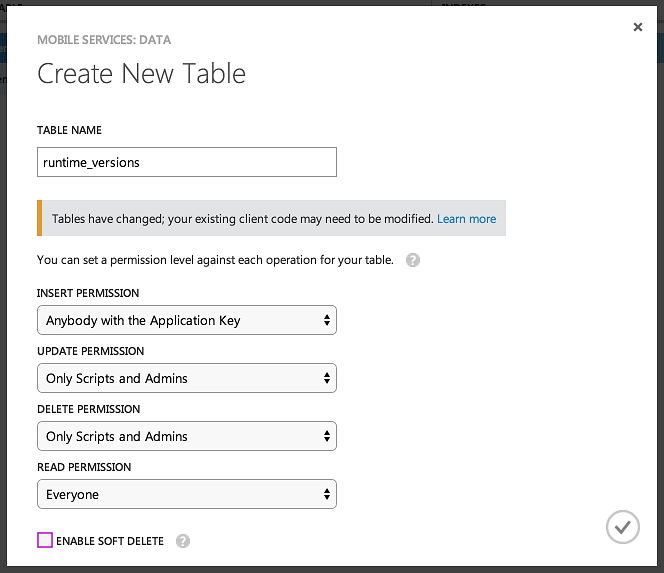
Create two columns both of String type called 'name' and 'version' respectively.
### Index
* [Bash](#bash)
* [PowerShell](#powershell)
* [Python](#python)
* [VBScript](#vbscript)
#### Bash
```bash
#Set up service URL, token and data
url="https://kiwiot.azure-mobile.net/tables/runtime_versions"
application_key="jpZgynEqcTHISISAFAKEKEYWwhOxeo21"
runtime_name="Bash"
runtime_version=$BASH_VERSION
post_data="name=${runtime_name}&version=${runtime_version}"
post_headers="X-ZUMO-APPLICATION:${application_key}"
#POST data to Azure
curl $url -X POST --data $post_data --header $post_headers
```
[Back to Index ⇧](#index)
#### PowerShell
```powershell
#Allow us to URL encode our data
Add-Type -AssemblyName System.Web
#Set up service URL, token and data
$url = "https://kiwiot.azure-mobile.net/tables/runtime_versions"
$application_key = "jpZgynEqcTHISISAFAKEKEYWwhOxeo21"
$runtime_name = [System.Web.HttpUtility]::UrlEncode("PowerShell")
$runtime_version = [System.Web.HttpUtility]::UrlEncode($PSVersionTable.BuildVersion)
$post_data = "name=" + $runtime_name + "&version=" + $runtime_version
$post_headers = @{"X-ZUMO-APPLICATION"=$application_key}
#POST data to Azure
Invoke-WebRequest $url -Method POST -Body $post_data -Headers $post_headers
```
[Back to Index ⇧](#index)
#### Python
For Python we will be referencing a library called [requests](http://docs.python-requests.org/en/latest/user/quickstart/).
```python
import requests
import string
import sys
#Set up service URL, token and data
url = "https://kiwiot.azure-mobile.net/tables/runtime_versions"
application_key = "jpZgynEqcTHISISAFAKEKEYWwhOxeo21"
runtime_name = "Python"
runtime_version = string.split(sys.version, ' ')[0]
post_data = {'name' : runtime_name, 'version' : runtime_version}
post_headers = {'X-ZUMO-APPLICATION' : application_key}
#POST data to Azure
response = requests.post(url, data=post_data, headers=post_headers)
```
[Back to Index ⇧](#index)
#### VBScript
```vbscript
'Create a function to POST with
Function AzurePOST(sUrl, sData, sKey)
set oHTTP = CreateObject("Microsoft.XMLHTTP")
oHTTP.open "POST", sUrl, false
oHTTP.setRequestHeader "Content-Type", "application/x-www-form-urlencoded"
oHTTP.setRequestHeader "Content-Length", Len(sData)
oHTTP.setRequestHeader "X-ZUMO-APPLICATION", sKey
oHTTP.send sData
HTTPPost = oHTTP.responseText
End Function
'Set up service URL, token and data
url = "https://kiwiot.azure-mobile.net/tables/runtime_versions"
application_key = "jpZgynEqcTHISISAFAKEKEYWwhOxeo21"
runtime_name = "VBScript"
runtime_version = ScriptEngineMajorVersion & "." & ScriptEngineMinorVersion
post_data = "name=" & runtime_name & "&version=" & runtime_version
'POST data to Azure
AzurePOST url, post_data, application_key
```
[Back to Index ⇧](#index)
### Conclusion
It is straight forward enabling reporting/telemetry/storage of data from your scripts. Independent of platform! The next blog post will show how to consume this data.
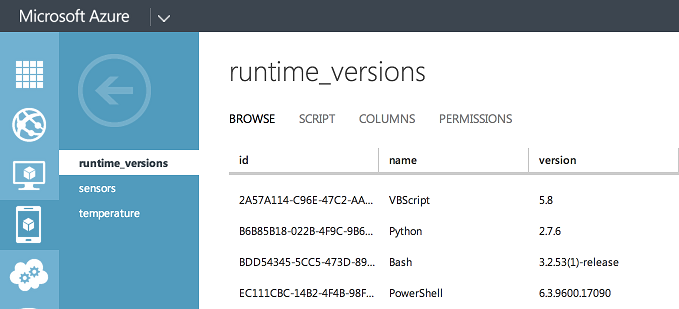
Comment below if there are other languages you would like to see here.
Jourdan