# Publishing App-V 5.0 content with a wildcard SSL certificate
- URL: https://blog.jourdant.me/post/app-v-publishing-app-v-5-content-with-a-wildcard-ssl-certificate
- Author: Jourdan Templeton
- Published: 2014-11-13T21:24:00.000Z
- Updated: 2015-01-31T22:05:26.487Z
- Category: App-V
- Tags: App-V, SSL
- Summary: Why the App-V 5.0 Management Console fails behind a load balancer with a wildcard certificate, and the one-line hosts file fix.
I encountered an issue when trying to load balance and publish the App-V 5.0 web services behind an F5 hardware appliance. The design and fix below will also apply to other methods of load balancing and publishing if a wildcard certificate is involved.
### Design
The App-V content is stored on a redundant file share published by an IIS Virtual Directory.
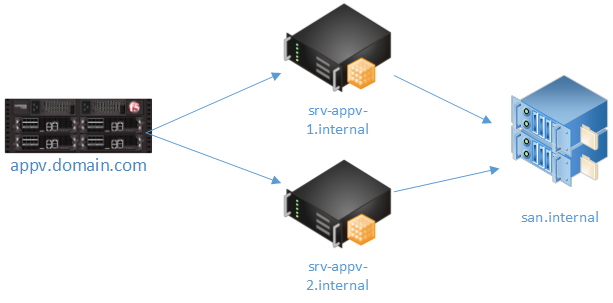
Example:
```
\\san.internal\appv5\AppV5_7-zip_9.20_x64\AppV5_7-zip_9.20_x64.appv ->
https: //srv-appv-1.internal/applications/AppV5_7-zip_9.20_x64/AppV5_7-zip_9.20_x64.appv
```
Published as:
```
https: //appv.domain.com/Applications/AppV5_7-zip_9.20_x64/AppV5_7-zip_9.20_x64.appv
```
Internally, the servers are using certificates signed by the internal CA. Externally, the F5 load balancer is publishing the servers with a wildcard _(*.domain.com)_ certificate.
### Problem
When browsing to the internal servers directly, everything worked great. Trying to add packages to the Management Console using the external URL however, became a problem.
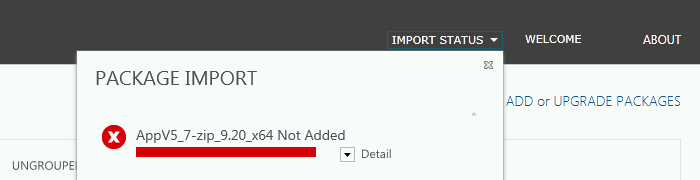
Digging in the event log showed a "Content Decoding Failed" error. After checking with a few people at Microsoft, this error seems to be related to certificate problems. Specifically if using a wildcard certificate. Turns out the Management Console doesn't like importing packages from a webserver published with a wildcard certificate.
### Solution
The solution is simple! Adding a single line to the hosts file of each App-V 5.0 Publishing Server solves the problem.
```
127.0.0.1 appv.domain.com
```
**Note: Don't forget to add the external domain name as a SAN to the certificate or this method will not work.**
When the Management Service connects to the URL to verify the files, it will connect to itself rather than the load-balancer; using the internally signed (non-wildcard) certificate.
**Bonus: The App-V 5.0 client (and PowerShell cmdlets) work perfectly fine with the wildcard cert and load-balanced configuration.**
Jourdan